

Properties — Standard, Inherited, and Custom
The properties of a repository type or repository play a crucial role in configuring the system landscape and defining how systems interact within ROI iAM.
Types of Properties
There are three types of properties in the System Landscape:
Standard Properties
- Read-only — values are predefined and cannot be changed.
- Appear only for repository types.
- Standard properties differ across systems and repository types.
Inherited Properties
- Inherited from the repository type to its corresponding repositories.
- Values can be modified during repository creation or later, depending on the version or revision.
- Appear only for repositories.
- Cannot be deleted on repository level.
Custom Properties
- Can be created for both repository types and repositories.
- Custom properties created at the repository type level are inherited by their repositories.
- Can be edited or deleted, depending on the version or revision.
.Bifzv9g5.png)
Actions on Properties
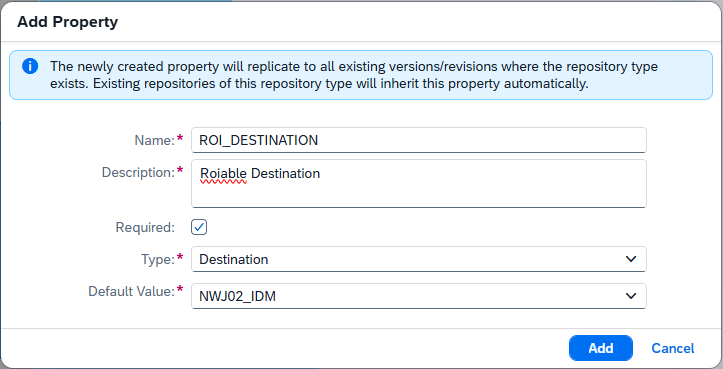
Creating a Property
To create a new property:
- Click the “Create” or “+” button in the header of the Properties table.
- Fill in the required information in the dialog:
- Name and Description
- Required — defines whether the property value must be set.
⚠ Warning: If a property is created at the repository type level and marked as required, the default value can remain empty (unassigned). However, the property value must be set at the repository level.
- Type — select one of the available property types.
- Default Value / Value — define the property’s value.
⚠ Warning: Properties with the same name cannot exist within the same scope.
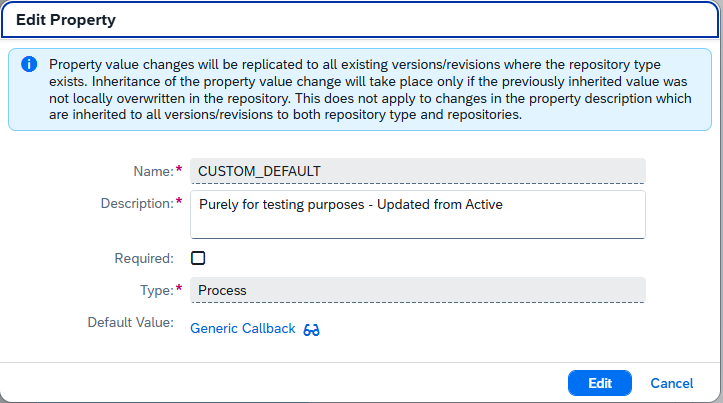
Editing a Property
- Editing is allowed for inherited and custom properties.
- Can be performed in any version or revision.
- You can modify:
- Description
- Value / Default Value
- The Required flag can only be edited in a revision.
TIP
Always review the warning message displayed in the dialog before creating, editing, or deleting a property — it contains important information about potential system impacts.
Deleting a Property
- Deletion is allowed only for custom properties, at both repository and repository type levels.
- Can be performed only in a revision.
Property Actions Summary
| Action | Repository Type | Active Version / Revision | Repository | Active Version / Revision |
|---|---|---|---|---|
| Create property | ✔ | Any version or revision | ✔ | Any version or revision |
| Edit property | ✔ | Any version or revision | ✔ | Any version or revision |
| Delete property | ✔ | Revision | ✔ | Revision |