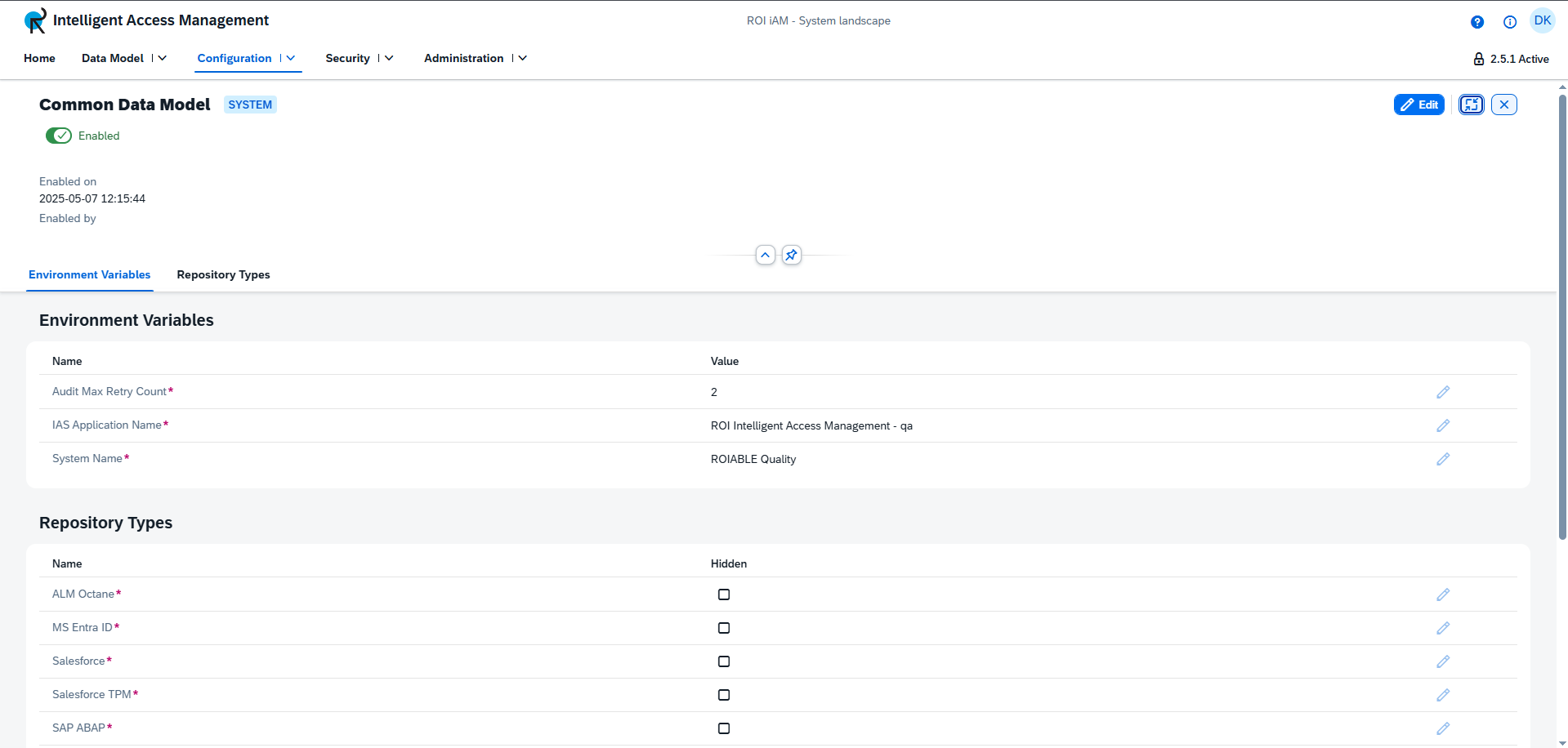
Common Data Model Details
The Common Data Model (CDM) allows administrators to control key configuration aspects of the ROI iAM System Landscape. It consists of the following sections:
Header
The header provides essential information and controls for the CDM, including:
- State — Indicates whether the Common Data Model is enabled or disabled. Represented by a toggle switch below the title.
- Status History — Displays when the CDM was last enabled or disabled, and by whom.
Environment Variables
The Environment Variables section displays a table of all available variables and their assigned values. Each variable can be modified by clicking the Edit button in its row, which opens a dialog to change the value.
Repository Types
This section lists all available repository types within their systems and indicates whether they are visible or hidden. The visibility can be modified by clicking the Edit button in the corresponding row, which opens a dialog for changing the state.
TIP
The Common Data Model can only be edited in an Active version.
⚠ Warning: The Edit Mode for the entire details view must be enabled to modify any section or value.