

New repository using ROI iAM
The new repository option is recommended when SAP IdM does not have a standard direct connector to the target system. It is also suitable when the existing connector is heavily customized and switching to the out-of-the-box ROI iAM connector is the more appropriate option.
Prerequisites
- The installation steps of the ROIABLE IdM accelerator must be completed.
- The repository must be configured on the ROI iAM side (source, target, and system details).
- The initial load of the system has been executed in ROI iAM.
- All master data for the identities must be loaded within ROI iAM.
IMPORTANT
In this scenario, all objects created within SAP IdM for the connected repository are controlled by ROI iAM.
Configure connector repository
If a new system is to be connected, a repository of type ROIAM_CONNECTOR should be created.
The following repository constants can be maintained:
ROIAM_HUB_REPOSITORY– HUB repository storing ROI iAM connection details and configuration. The constant is mandatory.ROIAM_TARGET_REPOSITORY– Name of the system in ROI iAM. The constant is mandatory.ROIAM_FORM_TRIGGER– The GUID of the form used to retrieve the trigger attributes for the respective system. This constant is supported only at the repository level.HINT
If the value of
ROIAM_FORM_TRIGGERis empty,none, or<none>, no trigger attributes will be set on the repositories. Ifallor<all>is used as a value, the standard 200+ attributes will be set as triggers on the system.WARNING
The Enable and Disable plugins are dependent on the
MX_DISABLEDattribute. Therefore, if the plugins are to be used, the attribute should be added to the form.ROIAM_EVENT_<eventName>– ROI iAM event type ID representing the SAP IdM CreateUser plugin. If it is empty, the value will be inherited from the HUB repository.ROIAM_SCHEMA_<eventName>– ROI iAM schema identifier used for<eventName>event data. If it is empty, the value will be inherited from the HUB repository.ROIAM_FORM_<eventName>– GUID of the form used as the attribute source for<eventName>. If it is empty, the value will be inherited from the HUB repository.HINT
If
ROIAM_FORM_MODIFYis left empty on both connector and HUB repositories, the modify plugin will be skipped.
Full connector load
The full connector load can be executed at any time without causing any effect other than the one produced on initial execution. Triggers of privileges will be removed and restored safely if all steps are executed sequentially. Users and assignments will be loaded in the event of inconsistencies between ROI iAM data and the SAP IdM data, with priority given to the ROI iAM landscape.
The Admin UI contains job references that can be used for executing the jobs.
- Go to the Jobs section of the respective repository to execute job "[FULL_1] Read - ROI iAM data".
- A successful run can be confirmed in the Admin UI; the loaded data can be verified in the database.
- The following tables should be generated and contain the necessary information:
roiam_%$rep.$NAME%_usersroiam_%$rep.$NAME%_userLinks_loadroiam_%$rep.$NAME%_accountsroiam_%$rep.$NAME%_groupsroiam_%$rep.$NAME%_groupMembers_load
- The following tables should be generated and contain the necessary information:
- Executing steps 2, 3, and 4 of the connector's full load for the connector repository should guarantee the replication of ROI iAM access in SAP IdM:
- "[FULL_2] Write - SAP IdM attributes and system privileges" – standard SAP IdM attributes and privileges are generated.
- "[FULL_3] Write - ROI iAM data in IdM" – accounts are populated, privileges are created, and access is granted to the mapped identities.
- "[FULL_4] Activate - IdM triggers" – triggers are added to the respective privileges. Trigger attributes are attached to the system privilege based on the value of
ROIAM_FORM_TRIGGER.
Delta connector load
If significant changes are not expected, the delta connector load can be used instead of the full load. The job checks the modified date of the latest users adjusted during the full connector load, then loads the users who have been modified since then. On every subsequent execution, the latest modified user date is taken from the delta tables. If no users are returned, the date is retrieved from the roiam_<hubName>_delta_loads table, which is used for auditing and data tracking.
Unlike the full connector load, only two jobs need to be executed for the delta connector load.
- Open the repository in the SAP IdM Admin UI.
- Go to Jobs and execute job "[DELTA_1] Read - ROI iAM data".
- Execute "[DELTA_2] Write - ROI iAM data in IdM" and confirm it finishes successfully.
Additional features
1. Filter affected users
The ROIABLE IdM accelerator provides the option to filter which users are loaded and maintained by the full and delta loads from ROI iAM, based on a provided criterion. A special constant at the connector level controls this limitation: ROIAM_FILTERED_USERS. The constant stores an SQL query written by the end user. The only condition is that mcMskeyvalue must be returned by the query. As with SAP IdM source tabs, no semicolon is expected at the end. Example:
select mcMskeyvalue from mxi_entry me
join idmv_value_basic_all ivba on me.mcMskey = ivba.mskey
and ivba.AttrName = 'Z_INTERNAL' and ivba.aValue = '1'
WARNING
The ROIAM_FILTERED_USERS constant value has a length limitation of 2048 symbols. Take care not to exceed the limit.
Filtered users will be visible in the roiam_%$rep.$NAME%_filtered_users table after the read steps of either the delta or full load of the connector are executed. Additionally, a field called filtered is present in the roiam_%$rep.$NAME%_users and roiam_%$rep.$NAME%_users_delta tables, indicated with 1 when a user is filtered. If no condition is applied, all users will be loaded and this logic will be skipped.
2. Custom constants in ROIAM_CONNECTOR
A special constant named ROIAM_CUSTOMER_CONST is available for the ROIAM_CONNECTOR repository type. The purpose of this constant is to store key-value pairs for external use. Multiple pairs can be defined in a single constant, with each pair separated by a pipe (|). Up to 100 key-value pairs can be stored.
EXAMPLE
JCO_CLIENT=100|JCO_HOST=ABC – two different pairs with keys JCO_CLIENT and JCO_HOST which store the respective values 100 and ABC.
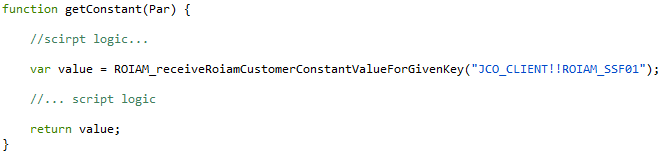
The values stored in ROIAM_CUSTOMER_CONST can be retrieved using the public script ROIAM_receiveRoiamCustomerConstantValueForGivenKey, which is part of the com.roiable.roiam.connector package. The script accepts the key and repository as input parameters, separated by !!. It searches the ROIAM_CUSTOMER_CONST value associated with the specified repository and returns the value corresponding to the provided key. Following the example above, the script can be used in another custom script outside the ROIAM packages to retrieve the value of the JCO_CLIENT for the relevant repository:
3. Privilege mskeyvalue naming convention
The ROIABLE IdM connector provides an option for configuring how privilege mskeyvalue values are created. Maintain the following constants to apply a custom naming convention to privileges loaded from the system.
ROIAM_UID_TEMPLATE– Controls how the IdM Privilege mskeyvalue is created. The default value isPRIV:<externalType>:<idm_rep_name>:<displayName>. The following parameters can be inserted in angle brackets to be replaced with data from the groups load or the IdM Repository name (idm_rep_name):iddisplayNamedescriptionuniqueIdentifierexternalNamesrcRepositoryexternalTypetypeidm_rep_name
ROIAM_UID_REGEX_REPLACE– Regex(es) (delimited with||) to be replaced in the last section of the template, after the last colon.ROIAM_UID_REGEX_REPLACE_SYMBOL– String(s) (delimited with||) to replace the strings found by the regex inROIAM_UID_REGEX_REPLACE. If multiple values are provided, the count must matchROIAM_UID_REGEX_REPLACE. Replacements work on a pair basis and are applied sequentially from left to right.ROIAM_UID_REGEX_REMOVE– Regex(es) or string(s) to be removed from the last section of the template, delimited with||.
These constants can be set at the HUB level, the CONNECTOR level, or both. If any of the fields at the CONNECTOR level are empty, the corresponding values from the HUB will be used. ROIAM_UID_REGEX_REPLACE and ROIAM_UID_REGEX_REPLACE_SYMBOL must either both be empty or both be configured.