

Configuration
The sections below describe the steps for a fresh installation or an update of ROI iAM in an SAP IdM environment.
SAP NetWeaver deployment
Prepare deployment files
- Ensure that
com.roiable.roiam.idm-proxy-<version>.earhas been provided by ROIABLE.
- Ensure that
Deploy ROI iAM Proxy
- Deploy the ROI iAM Proxy to the SAP NetWeaver Application Server Java (NWA), using telnet or any other standard method for deploying the
.earfile.
- Deploy the ROI iAM Proxy to the SAP NetWeaver Application Server Java (NWA), using telnet or any other standard method for deploying the
Create datasources in NWA
- Create the following datasources as "New JDBC Custom DataSource":
ROIAM_IDM_RT– runtime connection to the SAP IdM database.ROIAM_IDM_OPER– oper connection to the SAP IdM database.
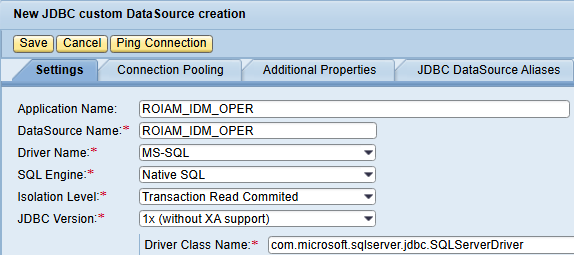
- Create the following datasources as "New JDBC Custom DataSource":
SAP IdM environment setup
Prepare ROI iAM SAP IdM packages
- Ensure you have the ROI iAM IdM packages provided by ROIABLE:
com.roiable.roiam.connector.<version>.idmpckcom.roiable.roiam.forms.<version>.idmpckcom.roiable.roiam.hub.<version>.idmpck
IMPORTANT
In case of manual changes to the packages, when a new package release is available, the customer is responsible for keeping track of these changes and applying them again after the import.
- Ensure you have the ROI iAM IdM packages provided by ROIABLE:
Import HUB package
- Import the
com.roiable.roiam.hubpackage into the target SAP IdM Identity Store. - Create a repository named
ROIAM_HUB_<landscape>using repository typeROIAM_HUB. - In the SAP IdM Developer Studio, execute the repository job "Generate ROI iAM HUB data" for the newly created repository.
- Import the
Create ROI iAM users in SAP NW User Management Engine (UME)
INFO
This step is required only during initial configuration.
Create user
ROIAM_APPRin SAP NW UME and grant the following SAP NW UME roles:IDM_UserIdm.userIdm.monitoring
Create communication user
ROIAM_TECHand assign SAP NW UME roleRoiamIdmProxy.
Import connector and forms packages
INFO
The import may fail if the previous three steps are not fully completed.
- Import the following packages into the SAP IdM Identity Store:
com.roiable.roiam.connectorcom.roiable.roiam.forms
WARNING
If the SAP IdM implementation is not using the default provisioning engine
com.sap.idm.provisioning.engineduring import of the ROIABLE connector package, you may encounter errors for dependencies of the following tasks:MX_ADD_MEMBER_TASK,MX_DEL_MEMBER_TASK, andMX_MODIFYTASK. If this occurs, refer to the Core Concepts page.- Import the following packages into the SAP IdM Identity Store:
Enhance the MX_PRIVILEGE_TYPE attribute
- Open the Identity Store and modify the
MX_PRIVILEGE_TYPEattribute by addingROIAM_CONNECTORas a value.
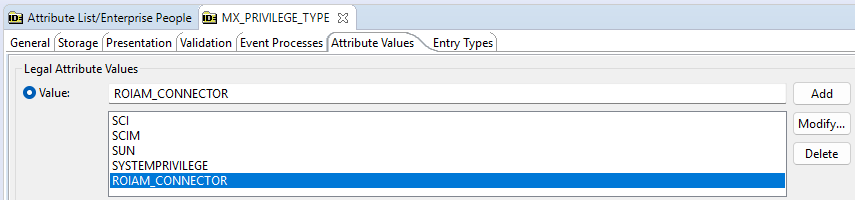
- Open the Identity Store and modify the
Configure the Keys.ini constant
- In the
com.roiable.roiam.hubpackage, set the KEYS_INI_FILE_PATH constant to the path of the encryption key file.
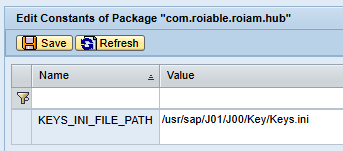
INFO
Use the same value used by the SAP IdM Developer Studio. In NWA, navigate to Java System Properties → Applications → idmdevstudio, locate the property
com.sap.idm.rcp.crypt.keyfile, and use its path for the HUB package constant.- In the
Cloud Connector
WARNING
Two of the prerequisite subaccounts configured in SAP BTP for ROI iAM must be connected to the SAP Cloud Connector: Subaccount A – Security (ROI iAM) and Subaccount B – Integration (SAP Integration Suite).
Connect the subaccounts
Perform the following steps for both subaccounts A and B.
- Log in to the SAP Cloud Connector administration UI.
- Choose Add Subaccount.
- Maintain the following parameters:
- Region – The SAP BTP region where the subaccount is hosted.
- Subaccount – The technical name of the SAP BTP subaccount.
- Display Name – Descriptive name for easier identification.
- Subaccount User – User with sufficient permissions in the subaccount.
- Password – Password for the subaccount user.
- Save the configuration. The subaccount should appear with status
Connected.
Configure the Cloud to On-Premise system
Perform the following steps for both subaccounts A and B.
- Choose the relevant subaccount → Cloud to On-Premise.
- Select Add System Mapping.
- Maintain the following fields:
- Back-end Type – Select
Non-SAP System. - Protocol – Select
HTTPS. - Internal Host – Hostname of the SAP IdM system.
- Internal Port – HTTPS port of the SAP IdM system.
- Virtual Host – Logical hostname exposed to SAP BTP.
- Virtual Port – Port exposed to SAP BTP.
- Allow Principal Propagation – Leave empty.
- Principal Type –
X.509 Certificate.
- Back-end Type – Select
- Save the configuration. The system should be displayed with status
Reachable.
Maintain the resources of the Cloud to On-Premise mapping
This step must be configured for Subaccount B – Integration (SAP Integration Suite) only.
- After defining the system mapping, expose the required resources.
- Add the following resource:
- URL Path –
/idm-proxy-rest/ - Active – Checked.
- Access Policy –
Path and All Sub-Paths.
- URL Path –
BTP Destination configuration
Perform the following steps for both subaccounts A and B.
- Go to the subaccount connected to the Cloud Connector.
- Open Destinations and create a new one From Scratch:
- Name – Logical name of the destination.
- Type – Select
HTTP. - Description – Optional description of the destination.
- Proxy Type – Select
OnPremise. - URL – Virtual host and port defined in the Cloud Connector.
- Location ID – Identifier of the Cloud Connector instance.
- Authentication –
BasicAuthentication. - User – The
ROIAM_TECHuser created earlier. - Password – The password of the
ROIAM_TECHuser set in the target SAP NW UME.
- Add one additional property:
- Key –
roiam_destination - Value –
true
- Key –