

Existing repository using ROI iAM
The existing repository option is used when a repository has already been configured and loaded within SAP IdM. To avoid losing the existing configuration and data history, the ROIABLE IdM Accelerator provides a way to continue using the existing implementation by only switching the provisioning to ROI iAM and enhancing the privilege loads with additional steps.
Prerequisites
- The installation steps of the SAP IdM accelerator must be completed.
- The repository is configured on the ROI iAM side (source, target, and system details).
- The initial load of the system has been executed in ROI iAM.
- All master data for the identities must be loaded within ROI iAM.
IMPORTANT
In the current scenario, the source of the entries does not change. SAP IdM continues to create the MX_PRIVILEGE entries while ROI iAM load jobs enhance them with the ROIAM_IDENTIFIER required for the provisioning to the target systems.
Repository type constants
- Open the Repository Type of the existing repository that will integrate with ROI iAM.
- Create two repository constants of category Repository Type Constant With Override:
ROIAM_HUB_REPOSITORY- Data Type – String
- Description – Name of the HUB repository used for ROI iAM configuration. If empty, provisioning uses the standard connection.
ROIAM_TARGET_REPOSITORY- Data Type – String
- Description – Name of the target repository in ROI iAM.
Update of repository type plugins
Each relevant plugin must be adapted so ROI iAM connection is established when ROIAM_HUB_REPOSITORY is set.
- Open the CreateUser plugin of the target repository type/package.
- Add a Conditional task immediately before the backend creation step.
- Use the following SQL Query condition:
SELECT
  CASE
    WHEN varValue IS NULL OR varValue = '' THEN 0
    ELSE 1
  END AS hubRepo
FROM mc_repository_vars %NOLOCK%
WHERE Repository = %REPID%
  AND VarName   = 'ROIAM_HUB_REPOSITORY'
Route the standard CreateUser process task to the False branch of the condition:
- Place the existing CreateUser task in the False branch.
- Move "Update User ACCOUNT" (or equivalent) below the CreateUser task in the False branch.
- Keep any other backend update tasks in the False branch in their correct order.
Plug the ROI iAM task into the CreateUser process:
- Open
com.roiable.roiam.connector→ Processes → Plugins. - Drag the CreateUser plugin from this package into the target process.
- Place the ROI iAM CreateUser process in the True branch of the conditional task.
The result should be:
- False branch – original backend flow, including account update and all backend-related operations.
- True branch – ROI iAM connector CreateUser process.
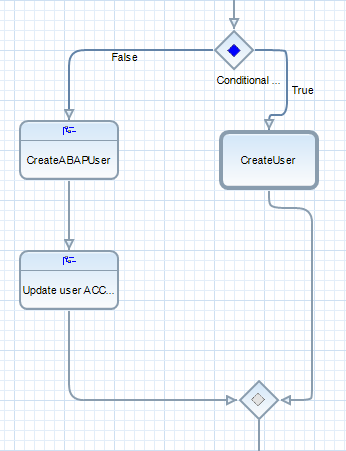
- Open
Repeat the same conditional pattern for the following plugins:
CreateUserModifyUserDeleteUserAssignUserMembershipRevokeUserMembershipEnableUserDisableUser
ROI iAM load jobs
In the Jobs section of the target repository package:
- Create subfolder "ROI iAM jobs".
Create repository job "Initial load - ROI iAM privileges" of the same repository type the system is:
- Navigate to the
com.roiable.roiam.hubpackage → Target Loads. - Open the "Initial load - ROI iAM existing IdM repositories" job.
- Copy all passes from this job into the new job in the target package (or recreate the same structure and values).
- Link script
ROIAM_hubPrivilegesInitialLoadfromcom.roiable.roiam.hub.
- Navigate to the
Create repository job "Delta load - ROI iAM privileges":
- From
com.roiable.roiam.hub→ Target Loads, open "Delta load - ROI iAM existing IdM repositories". - Copy its passes into the new job in the target package (or recreate them).
- Link script
ROIAM_hubPrivilegesDailyLoadfromcom.roiable.roiam.hub.
- From
Populate the two repository constants created in step 1 for each system that provisions via ROI iAM:
ROIAM_HUB_REPOSITORY– HUB repository used for ROI iAM configuration.ROIAM_TARGET_REPOSITORY– System name in ROI iAM.
IMPORTANT
ROIAM_HUB_REPOSITORYacts as an on/off switch for ROI iAM provisioning. If a HUB is specified in this constant for the respective target system in the Admin UI, provisioning will go through ROI iAM. If the constant is left blank, the standard provisioning steps will be executed for users in that target system.Execute "Initial load - ROI iAM privileges" and verify:
- The job log shows success.
- Temporary table
roiam_%$rep.$NAME%_groups_initialexists. - Data in the temporary table looks correct.
- All existing roles/groups in the repository have attribute
ROIAM_IDENTIFIER_<hubName>populated.
Execute "Delta load - ROIAM privileges" and verify:
- Temporary table
roiam_%$rep.$NAME%_groups_deltapopulates as expected. - Schedule this job to run immediately after the standard "Daily Load – Roles job" for the repository.
- Temporary table