

Scheduler
Overview
The ROIAM_SCHEDULER Partner Directory entry configures the ROI iAM - Framework - Scheduler iFlow. It stores schedule definitions that tell the iFlow which processes to trigger and at what intervals, using a JSON structure held in a binary parameter.
This guide covers the structure of the iFlow_Schedules configuration file, the meaning of each field, and how the Scheduler iFlow uses this data at runtime.
Prerequisites
The ROI iAM - Framework - Scheduler iFlow must be deployed and running in SAP Cloud Integration before the ROIAM_SCHEDULER Partner Directory entry takes effect. For iFlow deployment instructions, see iFlows.
Configuration
The ROIAM_SCHEDULER Partner Directory entry is used by the ROI iAM - Framework - Scheduler iFlow. It contains the configuration for iFlows that need to run on a schedule. All information is stored in JSON format within a binary parameter with ID iFlow_Schedules.
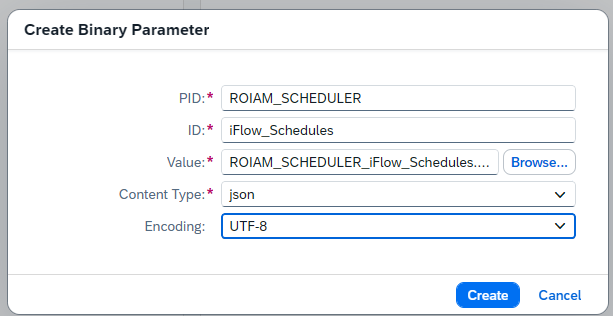
The structure of the iFlow_Schedules file is as follows:
{
  "schedules": [
    {
      "processId": "<unique identifier of the schedule that needs to match an existing Process Direct>",
      "period": "PT1H",
      "period_comment": "'P1DT2H3M4S' is 1 day, 2 hours, 3 minutes, and 4 seconds, whereas 'PT30M' is 30 minutes",
      "initial_startDateTime": "2025-11-14T13:11:56Z",
      "headers": {
        "roiam_customer_system_name": "<example repository name>",
        "roiam_scim_skip_write": false
      },
      "headers_comment": "headers will be sent to the target iflow",
      "body": {}
    }
  ]
}
The schedules attribute is an array that can be either empty (no schedules defined) or contain one or many schedule objects as shown above. The fields in each schedule object are:
processId– A unique identifier for the schedule. Must match an existing Process Direct.period– The recurrence interval in ISO 8601 duration format (e.g.,PT1Hfor 1 hour,PT30Mfor 30 minutes,P1DT2H3M4Sfor 1 day, 2 hours, 3 minutes, and 4 seconds).initial_startDateTime– The datetime from which the schedule begins evaluation, in ISO 8601 format.headers– A map of headers that will be sent to the iFlow when triggered.body– The body to be set during the iFlow call from the Scheduler.
Runtime behavior
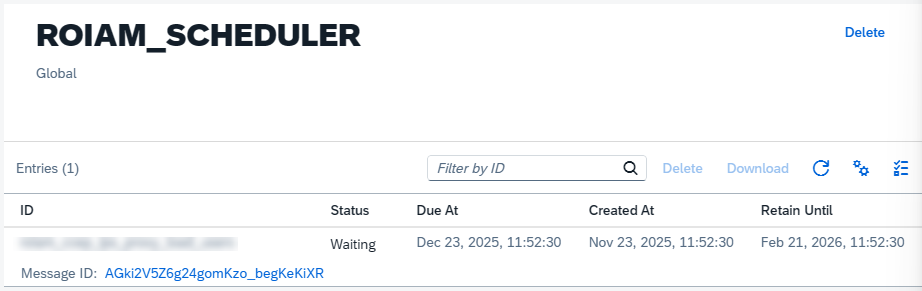
The iFlow Scheduler reads the iFlow_Schedules configuration and makes an automated decision about whether each schedule is ready to run. The information about the last run for each processId is stored in a global data store named ROIAM_SCHEDULER:
In addition to iFlow_Schedules, there is a dummy backup binary parameter that keeps the default structure of the JSON for reference purposes. It is also used as a keeper for the Partner Directory entry. If you need to re-upload iFlow_Schedules and delete it before doing so, this will also remove the entire Partner Directory entry. To avoid this, the dummy entry must remain in place.
Once all Partner Directory artifacts are created, the entry should look like this:
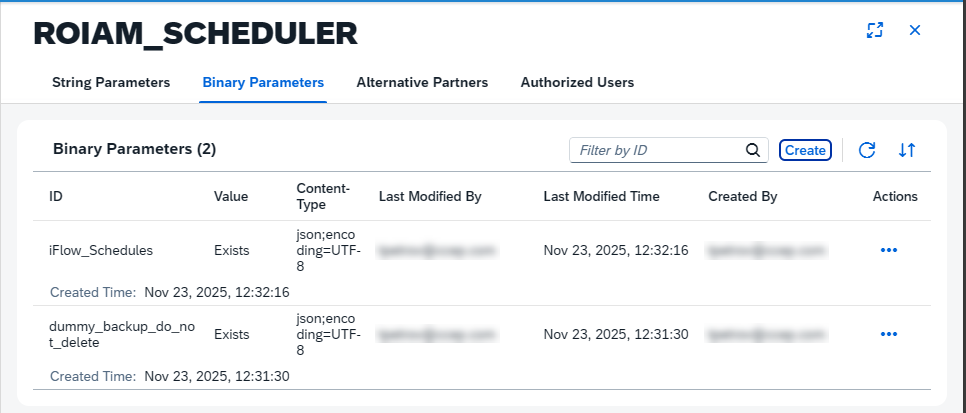
The dummy_backup_do_not_delete parameter shown above is an example entry that serves as a placeholder and reference template. You can use it as a starting point when creating future schedules.
See also
- Partner Directory — full Partner Directory configuration reference for the installation guide
- iFlows — iFlow deployment and configuration