

Partner directory
The Partner Directory of SAP Integration Suite is used to simplify the configuration of various aspects of ROI iAM. Below are listed the partner directory entries, which need to be configured for the proper operation of the product.
TIP
When creating a new Partner Directory, the PID should match the provided name of the directory, but the ID should be the name of the first property, alongside by its type and value.
Example: 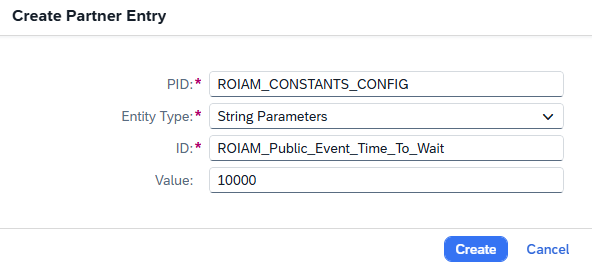
ROIAM_CONSTANTS_CONFIG
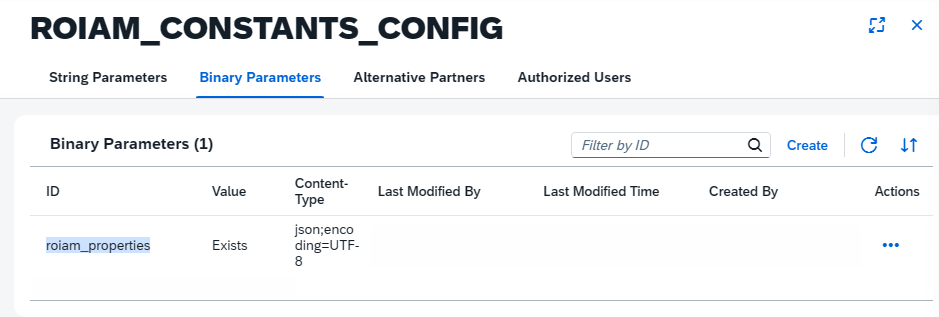
This partner directory contains string properties and a binary file, which allow the solution to be configured without touching the actual artefacts in the SAP Cloud Integration tenant. The properties are as follows:
ROIAM_Public_Event_Time_To_Wait– The period during, which the event consumer iFlow will wait for incoming events, before grouping them together for processing- Default value 10 000 ms. Do not change it unless explicitly requested.
ROIAM_SCIM_Cred_Name– The Credential name from the Security materials of SAP Cloud Integration. Used for calling the ROI iAM SCIM API from iFlows.TIP
The recommended value should start with ROI_iAM as prefix. Default value ->
ROI_iAM_SCIM_oAuth2_Client_CredentialsIf the credentials do not exist in the Security materials of SAP Cloud Integration, create them using the following steps:
Type: OAuth2 Client Credentials
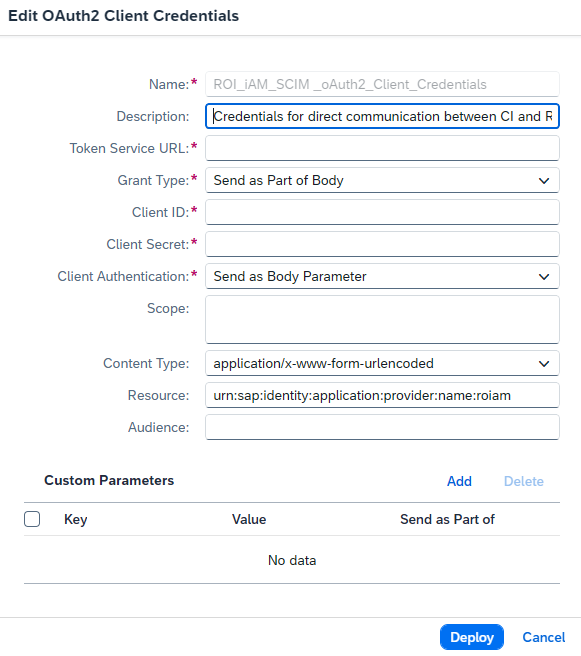
Description: Credentials for direct communication between CI and ROI iAM SCIM
Token Service URL:
/oauth2/token
TIP
From the SAP BTP subaccount where ROI iAM is deployed, navigate to Instances and locate the instance named
ROIAM_authentication_ias_consumer. A service key named "consumer_key" should be available. Extract the "url" attribute value.- Client ID : (clientid)
TIP
From the SAP BTP subaccount where ROI iAM is deployed, navigate to Instances and locate the instance named
ROIAM_authentication_ias_consumer. A service key named "consumer_key" should be available. Extract the "clientid" attribute value.- Client Secret : (clientsecret)
TIP
From the SAP BTP subaccount where ROI iAM is deployed, navigate to Instances and locate the instance named
ROIAM_authentication_ias_consumer. A service key named "consumer_key" should be available. Extract the "clientsecret" attribute value.- Resource: Fixed value:
urn:sap:identity:application:provider:name:roiam
ROIAM_SCIM_URL– The host where the SCIM API is deployed.- This value can be taken from the SAP BTP subaccount where ROI iAM is deployed by looking for the URL of the application named "ROIAM_SCIM_REST".
API_Mgmt_Default_Page_Size– Used for paging during SCIM calls.- Default value: 100. Increase it if the system is performing well to reduce roundtrips from the iFlow.
API_Mgmt_Key– The API key used for communication with API Management.TIP
This is maintained in the Security Material section of SAP Cloud Integration as a Secure Parameter. The API key can be taken from the Developer Hub Application (set up later in this document) named
ROIAM_Internal_Application.Default value:
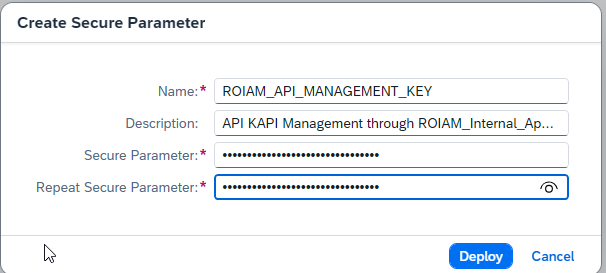
ROIAM_API_MANAGEMENT_KEYIf the secure parameter is not yet created in the Security material of SAP Cloud Integration, follow the steps below:
Within the Security Material, create an item of type Secure Parameter.
Enter
ROIAM_API_MANAGEMENT_KEYas the Name.Description: API KEY for communication with API Management through
ROIAM_Internal_Application.Secure Parameter and Repeat Secure Parameter are taken from the "key" value of the application
ROIAM_Internal_Applicationwithin the Developer Hub.
API_Mgmt_Cred_Name- The credential name from the Security materials of SAP Cloud Integration. Used for calling API Management from iFlows.The recommended value should start with ROI_iAM as a prefix. Default value:
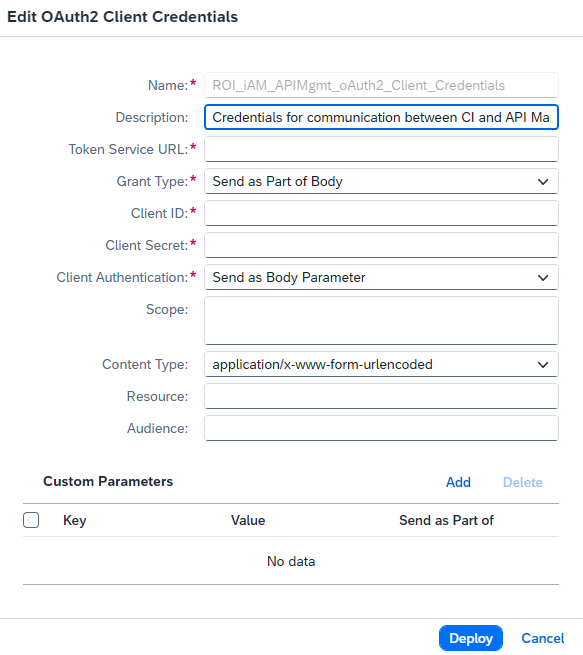
ROI_iAM_APIMgmt_oAuth2_Client_Credentials.If the credentials do not exist in the Security materials of SAP Cloud Integration, create them using the following steps:
Type: OAuth2 Client Credentials
Description: Credentials for communication between CI and API Management through ROIAM_Internal_Application.
Token Service URL: Built from the API Management URL configured in the next string parameter
API_Mgmt_URL, with the suffix/roiam/oauth/token.Client ID and Client Secret can be captured from the Developer Hub Application (set up later in this document) named
ROIAM_Internal_Application, respectively as "key" and "secret":
API_Mgmt_URL– The API Management URL to be used for communication from the iFlows.- This value can be taken from the Developer Hub when browsing any of the products that will be created later in the document. Here is an example:
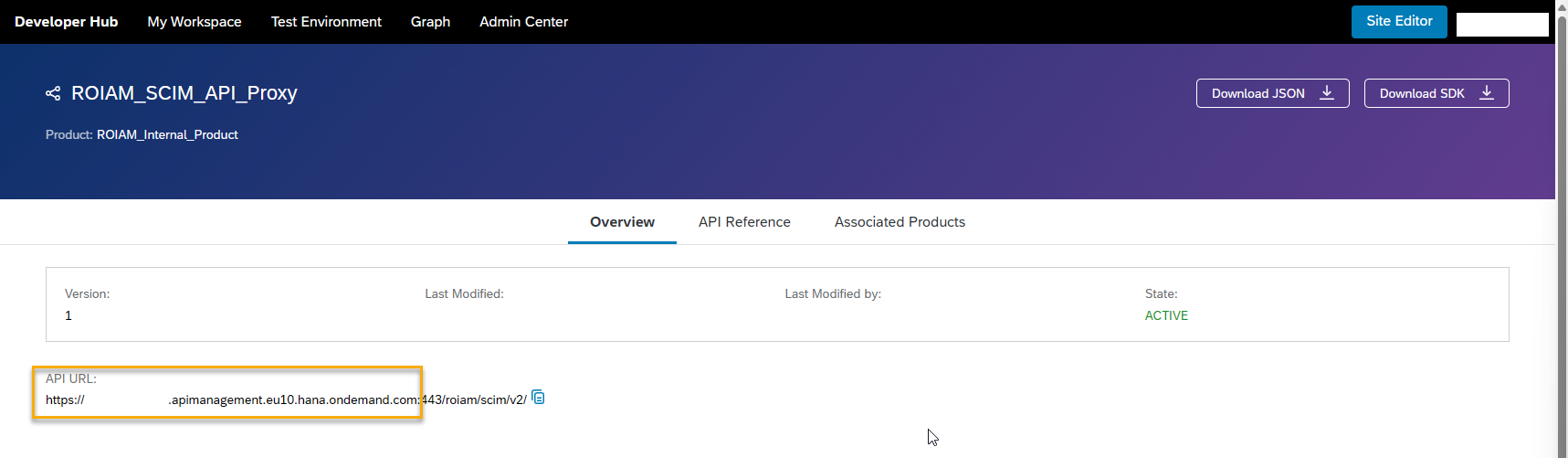
The URL is different for every API Management tenant and depends on the subaccount region as well as the virtual host name and account type defined in Settings → Runtimes during the setup of the SAP BTP Cloud Integration tenant.
Binary file for upload: This can be requested from ROIABLE. It requires no changes and simply needs to be uploaded under the following ID: "roiam_properties".
ROIAM_SCIM_BULK_STRUCTURES
The Partner Directory is used mainly to streamline the mapping of external data structures to the ROI iAM internal data model. For the full administration guide for this entry, see SCIM Bulk Structures.
ROIAM_SCHEDULER
This entry is used by the ROI iAM - Framework - Scheduler iFlow. It contains the configuration for iFlows that need to run on a schedule. For the full administration guide for this entry, see Scheduler.