

Applications
An application within SAP API Management generates a dedicated client ID and secret for consumption by external third-party applications. Its configuration is done using the "Developer Hub" in the SAP Cloud Integration tenant:
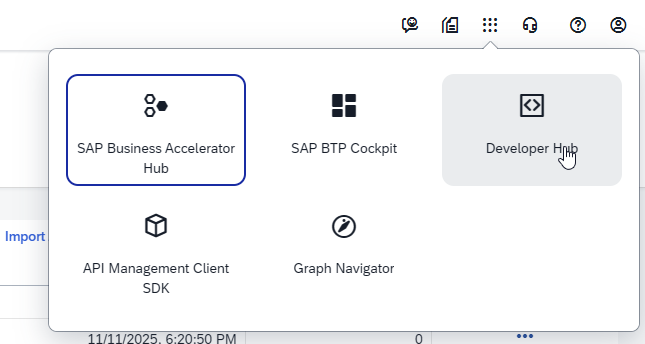
Applications are created from within the "My Workspace" menu.
ROIAM_Internal_Application
Description –> "Application for oAuth credentials for internal use"
Add Products:
- ROIAM_Internal_Product
Save
Navigate to custom attributes and create the following:
roiam_scim_whitelist ->
*roiam_ip_whitelist ->
0.0.0.0/0roiam_scim_users_filter ->
*roiam_scim_groups_filter ->
*
TIP
The custom attributes can be used to limit the access, which the application has on various aspects of the API proxy. For "ROIAM_Internal_Application", there is no point to limit those, since this application should have unrestricted access.
Navigate back to the overview and capture the Key/Secret
ROIAM_GRC_Application (applicable only for GRC accelerator)
Description –> "Application for oAuth credentials for GRC use"
Add Products:
- ROIAM_GRC_Product
Save
From Overview capture the Key/Secret
ROIAM_IDM_Application (applicable only for IdM accelerator)
Description –> "Application for oAuth credentials for IdM use"
Add Products:
- ROIAM_IDM_Product
Save
Navigate to custom attributes and create the following:
roiam_scim_whitelist ->
*roiam_ip_whitelist ->
0.0.0.0/0roiam_scim_users_filter ->
*roiam_scim_groups_filter ->
*
TIP
The custom attributes can be used to limit the access, which the application has on various aspects of the API proxy. For "ROIAM_IDM_Application", feel free to adapt those according ot the needs of the project and the security requirements - e.g. limiting the whitelist of IPs that can call this application.
Navigate back to the overview and capture the Key/Secret
ROIAM_Entra_Application (applicable only for Entra accelerator)
Description –> "Application for oAuth credentials for Entra use"
Add Products:
- ROIAM_Entra_Product
Save
Navigate to custom attributes and create the following:
roiam_scim_whitelist ->
*roiam_ip_whitelist ->
0.0.0.0/0roiam_scim_users_filter ->
*roiam_scim_groups_filter ->
*
TIP
The custom attributes can be used to limit the access, which the application has on various aspects of the API proxy. For "ROIAM_Entra_Application", feel free to adapt those according ot the needs of the project and the security requirements - e.g. limiting the whitelist of IPs that can call this application.
Navigate back to the overview and capture the Key/Secret